

What is an ACP agent?
The Agent Client Protocol (ACP) is a standard for talking to coding agents over JSON-RPC on stdio. Instead of Agent Canvas calling an LLM directly, the Agent Server spawns the agent’s own CLI as a subprocess and relays each turn to it. The external agent manages its own LLM, tools, and execution; Agent Canvas sends messages and renders what comes back. The Agent Server owns the subprocess and the credentials; Agent Canvas only records which agent to run and surfaces a form for the secrets it needs. The agent choice is stored per backend, so switching backends can switch agents.Supported providers
You can pick any of these during onboarding, in the Choose your agent step:
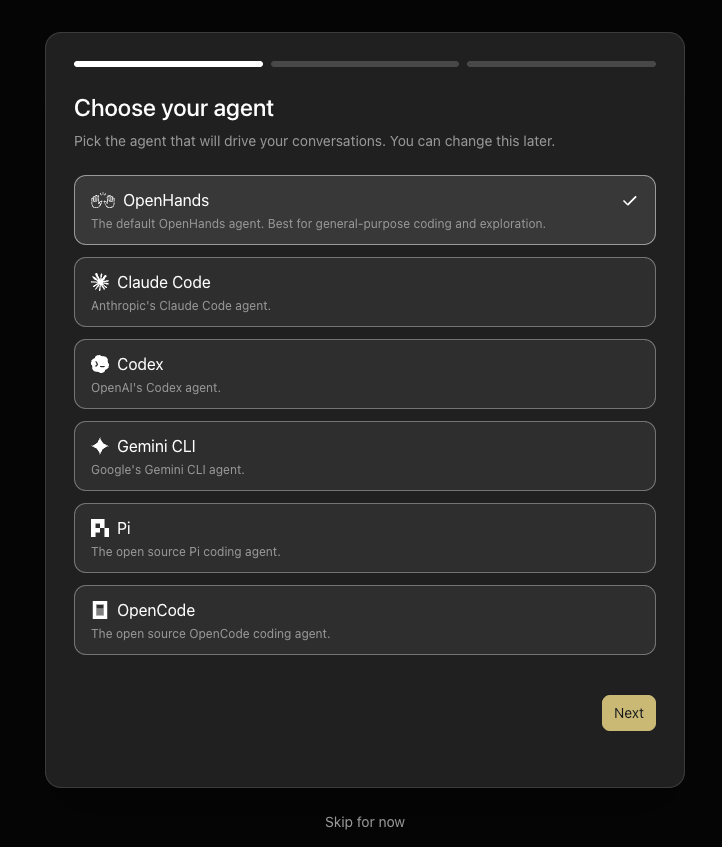
npx.
The provider list is sourced from the OpenHands SDK registry (openhands.sdk.settings.acp_providers, mirrored into @openhands/typescript-client) and enriched with Canvas UI metadata. Adding or changing a provider happens upstream in the SDK.
Authentication
ACP agents authenticate two ways: a subscription login, or an API key — and the onboarding fields are optional. If you’re already signed in to the provider’s CLI on the machine the agent runs on, it reuses that login automatically, so locally you often don’t need a key at all. The login takes priority over an API key: while you’re signed in, a key set in the environment isn’t used — so the onboarding key fields do nothing and can be left blank.
Each provider collects an optional API key in onboarding (plus a base URL where the provider honors one — Pi and OpenCode do not). As noted above, a subscription / OAuth login takes priority over an API key — when the provider’s CLI is signed in, a key set in the environment is not used:
- Codex —
codex login statuskeeps reporting the ChatGPT login even withOPENAI_API_KEYset. - Gemini CLI — uses the OAuth auth type chosen at
geminilogin;GEMINI_API_KEYis only consulted if you switch the auth type. The free Google login is the common no-key path locally — sign in once and it just works. - Claude Code — with both present,
claude auth statusreports it is authenticated via the subscription (claude.ai), not the key. The login is auto-detected from the macOS Keychain (or~/.claude/.credentials.jsonon Linux);CLAUDE_CONFIG_DIRis not required for it — it only relocates Claude Code’s config directory (settings/history, not the token) and signals the SDK to strip a conflictingANTHROPIC_API_KEY/ANTHROPIC_BASE_URL.
- Pi needs some credential: with none, the session fails with
Authentication required. Pi picks its model from whichever provider that credential unlocks, so Canvas does not preselect one. To route Pi through a proxy, declare the provider in Pi’s ownmodels.json;ANTHROPIC_BASE_URLis ignored. Pi’s key is the sameANTHROPIC_API_KEYsecret Claude Code reads, and Claude Code then uses it instead of your Claude login. - OpenCode runs without any credential on OpenCode Zen’s free models (including its default,
opencode/big-pickle), so its credential step never blocks onboarding. A key or login unlocks the paid models.
*_BASE_URL): a custom value points the CLI at a different endpoint (a proxy or gateway) and does take effect even under a login — for Gemini it rides the ACP gateway param. It’s an advanced override, not needed for normal use.
Onboarding an ACP agent
First-time users get a four-step onboarding modal. To onboard an ACP agent:- Choose agent — pick Claude Code, Codex, Gemini CLI, Pi, or OpenCode instead of OpenHands. The choice is saved immediately to your backend’s settings.
- Check backend — confirms Agent Canvas can reach the Agent Server.
- Set up credentials — enter the provider’s credentials. Beyond the API key (and, where the provider honors one, an optional base URL), this step also collects the credentials a containerized backend needs, since a fresh container has no host login:
- Codex —
CODEX_AUTH_JSON(the contents of~/.codex/auth.json). - Claude Code —
CLAUDE_CODE_OAUTH_TOKEN(a Pro/Max OAuth token). - Gemini CLI —
GOOGLE_APPLICATION_CREDENTIALS_JSON(Vertex SA / ADC JSON) plusGOOGLE_CLOUD_PROJECT,GOOGLE_CLOUD_LOCATION, andGOOGLE_GENAI_USE_VERTEXAI. - Pi —
PI_AUTH_JSON(the contents of~/.pi/agent/auth.json). - OpenCode —
OPENCODE_AUTH_CONTENT(the contents of~/.local/share/opencode/auth.json).
- Codex —
- Say hello — creates your first conversation and closes the modal.
Every credential field is optional and the step is skippable. Leave a field blank to reuse a key already set on the backend, or to authenticate the agent through a subscription / OAuth login instead.
How credentials reach the agent
Each credential you enter is saved as a global secret whose name is exactly the environment variable the Agent Server exports into the ACP subprocess (e.g.ANTHROPIC_API_KEY). Saving in onboarding is identical to adding the secret under Settings → Secrets, where you can edit or remove it anytime. Keeping the secret name equal to the env var is what makes a saved key actually reach the provider CLI.
Run ACP agents in a container
The walkthrough above assumes the Agent Server runs on your own machine, where the provider CLIs reuse a host login. You can also run the Agent Server in a container. Canvas drives it the same way, but since a fresh container has no host login, you supply credentials through the UI and Canvas sends them inline on the conversation start request. In onboarding’s Set up credentials step, the credentials you enter are saved as global secrets in the agent-server’s secret store (as usual). The start request then references each as a lookup secret, and the agent-server resolves the value back from its own store at spawn time. On a local backend the step stays optional (a host login is reused automatically); on a Docker or cloud backend it is required, because there is no host login to fall back on. When the login probe detects an existing session, the step shows a “you’re already signed in” banner and stays skippable. OpenCode’s step is always skippable, since it can run on free models without a credential.Switching agent or model later
Open Settings → Agent at any time:- Agent — switch between OpenHands and ACP.
- Preset — pick a built-in provider (Claude Code, Codex, Gemini CLI, and, on a local backend, Pi or OpenCode) or Custom to point at any other ACP server.
- Command — the command line used to spawn the subprocess. Selecting a preset fills this in; editing it to match another preset re-detects that provider. API keys are not entered here — they live in the Secrets panel.
- Credentials — sign in or add the provider’s keys. They come before the model because the models a provider offers depend on them.
- Model — Agent default (the provider picks, saving no model), one of the provider’s models, or a custom model ID. Gemini has no Agent default; Canvas preselects
gemini-2.5-pro(see the note in Run ACP agents in a container).
POST /api/acp/models) to start the provider with your saved credentials and report the models it offers and the one it uses by default, so account-dependent catalogs (a ChatGPT plan’s Codex models, a Claude subscription’s aliases, OpenCode’s free tier versus a Zen key) show what you can actually run. The first lookup can take a few seconds while the provider starts; results are cached. If the agent rejects its login, Settings says so instead of showing a stale “signed in” banner.
Cloud can’t ask before a conversation starts, so until then the model field offers Agent default and a custom model ID. Each conversation’s session reports its models, which the in-chat picker offers for switching mid-conversation; Canvas remembers the last list per backend, provider, and secret scope in the browser and offers it in Settings and on the home page from then on, only to profiles that allow the same secrets (also the fallback for older agent-servers and failed lookups).
Saving writes an agent_settings_diff (agent_kind, acp_server, acp_command, acp_model) to PATCH /api/settings. A running conversation keeps the agent it started with; the new choice applies to conversations you start afterward.