

View source on GitHub
This example is Enterprise-only. The endpoints do not exist on OpenHands Cloud or the open-source build. The provisioning endpoint is also off by default, so an operator must enable it (see Enabling the Feature).
How It Works
Every call is made as the superadmin. Theapi_key that comes back is what your system stores and uses afterwards.
POST /api/organizationscreates the org. Only a superadmin can do this, and the creator is not added as a member.POST /api/organizations/provision-usercreates a user in that org. The target org goes in theX-Org-Idheader, and the call bypasses email verification, terms of service, and OAuth.- Use the returned
api_keyas a Bearer token to act on that user’s behalf.
email, a password (generated if you did not supply one, and returned only on a true create), and an api_key bound to the target org.
Idempotency
provision-user is idempotent. Re-running it for an email that already exists does not fail or duplicate the account. The server skips the create steps, ensures org membership, and resolves an API key. The action field and the HTTP status tell you which branch it took:
The existing Keycloak password is never rotated, so
password is null on both idempotent paths. By default the endpoint returns the user’s existing API key. Pass reissue_api_key: true (or --reissue-api-key on the script) to delete the old key and mint a fresh one. Use this to recover a user who lost their key.
Prerequisites
- An OpenHands Enterprise instance with user provisioning enabled (see Enabling the Feature).
- The superadmin bearer token for that instance. On a fresh install, the superadmin is the first user to authenticate.
pip install requests
A superadmin can list its peers with
GET /api/admin/super-admins. That endpoint requires superadmin, unless user provisioning is enabled on OHE 1.62.0 or later, when any signed-in user can call it. There is no self-service “am I the superadmin?” endpoint. The org-admin example shows how to find the superadmin and grant the role to more users.Run It
Run these from theprovision-users/ directory.
GET /api/organizations/{org_id}/me, then deletes both again.
--show-secrets to print them in full.
A superadmin has no org-scoped powers, so deleting an org needs the key of an org owner. When none of the demo users is an owner, the script provisions a short-lived
cleanup-…@example.com owner for that step and deletes it with the others.- New Org
- Existing Org
- Recover a Lost Key
The Two Calls That Matter
Create the org. The superadmin is not added as a member:X-Org-Id header, not the URL:
role is one of member (default), admin, or owner. You can also pass an optional password (it must satisfy the realm policy), api_key_name, and reissue_api_key.
Enabling the Feature
The endpoint is registered only when the operator turns it on. Both install types setUSER_PROVISIONING_ENABLED=true on the app server:
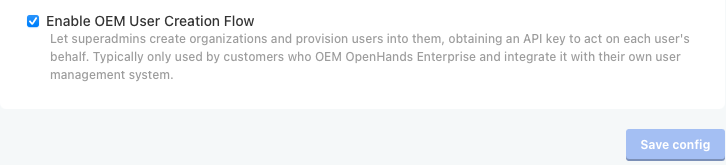 When it is disabled,
 POST /api/organizations/provision-user returns 404. Org creation and superadmin management are always available.
Troubleshooting
401 Invalid service API key
401 Invalid service API key
You are calling the wrong endpoint. That error comes from the internal service-to-service routes under
/api/service/*, such as POST /api/service/users/{user_id}/orgs/{org_id}/api-keys. They authenticate with the X-Service-API-Key header, checked against the operator-provisioned AUTOMATIONS_SERVICE_KEY shared secret. That key is meant for the internal automations service, not for admins.User provisioning is a different flow. Call POST /api/organizations/provision-user with an Authorization: Bearer <superadmin-token> header and X-Org-Id. It never uses X-Service-API-Key. X-Session-API-Key (per-sandbox agent-server auth, used in other examples) is also distinct from the plain Bearer token this endpoint expects.404 Not Found on provision-user
404 Not Found on provision-user
The feature is disabled. See Enabling the Feature.
403 Forbidden
403 Forbidden
The caller lacks the
PROVISION_USER permission (org owner or admin, or an instance super role), or you targeted a personal workspace. Provisioning into a personal workspace is rejected.Security
- Guard the superadmin token. Anyone holding it can create orgs, mint users, and grant or revoke superadmin. Treat it like a root credential.
- A superadmin does not inherit org-scoped powers (secrets, billing, LLM settings, org deletion) in the orgs it creates.
APIs Used
Related
service-account-github-pat
Act for many users from one account with per-conversation credentials
per-conversation-secrets
Inject secrets into a single conversation
User provisioning endpoint (OpenHands #14864)
The provisioning endpoint
Super roles (OpenHands #14937)
Instance-level superadmin roles
Idempotent re-provisioning (enterprise #117)
reissue_api_key, action, and 200 vs 201