> ## Documentation Index
> Fetch the complete documentation index at: https://docs.openhands.dev/llms.txt
> Use this file to discover all available pages before exploring further.
# Zed IDE
> Configure OpenHands with the Zed code editor through the Agent Client Protocol
[Zed](https://zed.dev/) is a high-performance code editor with built-in support for the Agent Client Protocol.
## Prerequisites
Before configuring Zed, ensure you have:
1. **OpenHands CLI installed** - See [Installation](/openhands/usage/cli/installation)
2. **LLM settings configured** - Run `openhands` and use `/settings`
3. **Zed editor** - Download from [zed.dev](https://zed.dev/)
## Configuration
### Step 1: Open Agent Settings
1. Open Zed
2. Press `Cmd+Shift+P` (Mac) or `Ctrl+Shift+P` (Windows/Linux) to open the command palette
3. Search for `agent: open settings`
 ### Step 2: Add OpenHands as an Agent
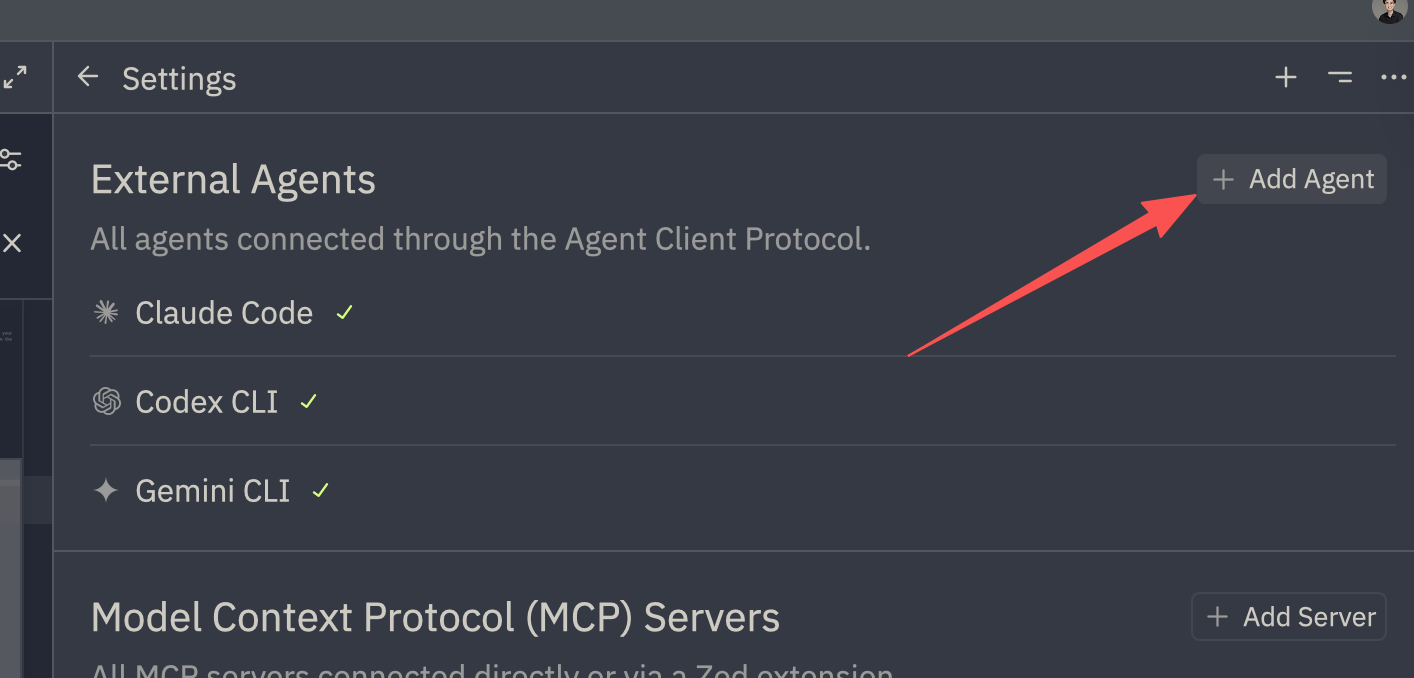
1. On the right side, click `+ Add Agent`
2. Select `Add Custom Agent`
### Step 2: Add OpenHands as an Agent
1. On the right side, click `+ Add Agent`
2. Select `Add Custom Agent`
 ### Step 3: Configure the Agent
Add the following configuration to the `agent_servers` field:
```json theme={null}
{
"agent_servers": {
"OpenHands": {
"command": "uvx",
"args": [
"openhands",
"acp"
],
"env": {}
}
}
}
```
### Step 4: Save and Use
1. Save the settings file
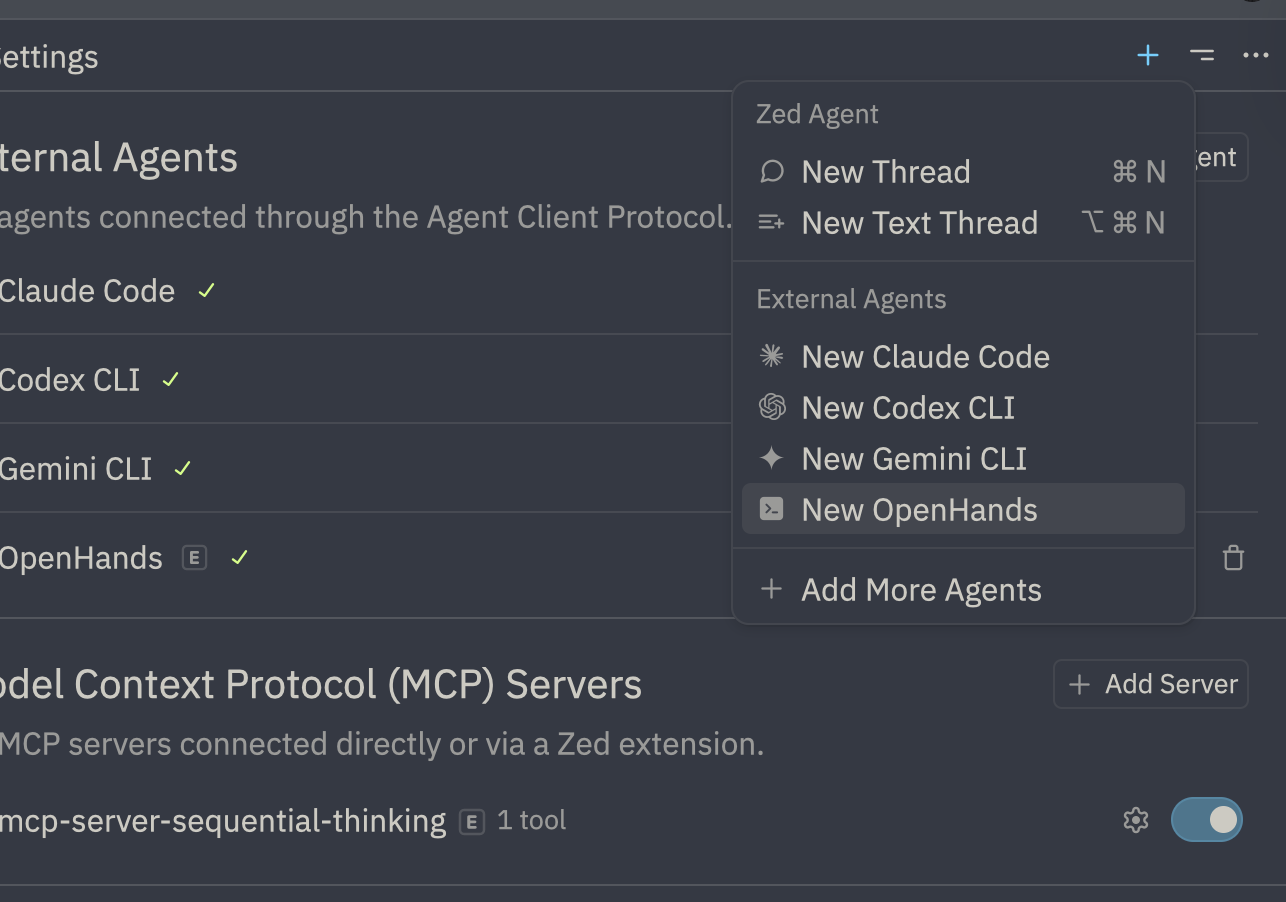
2. You can now use OpenHands within Zed!
### Step 3: Configure the Agent
Add the following configuration to the `agent_servers` field:
```json theme={null}
{
"agent_servers": {
"OpenHands": {
"command": "uvx",
"args": [
"openhands",
"acp"
],
"env": {}
}
}
}
```
### Step 4: Save and Use
1. Save the settings file
2. You can now use OpenHands within Zed!
 ## Advanced Configuration
### LLM-Approve Mode
For automatic LLM-based approval of actions:
```json theme={null}
{
"agent_servers": {
"OpenHands (LLM Approve)": {
"command": "uvx",
"args": [
"openhands",
"acp",
"--llm-approve"
],
"env": {}
}
}
}
```
### Resume a Specific Conversation
To resume a previous conversation:
```json theme={null}
{
"agent_servers": {
"OpenHands (Resume)": {
"command": "uvx",
"args": [
"openhands",
"acp",
"--resume",
"abc123def456"
],
"env": {}
}
}
}
```
Replace `abc123def456` with your actual conversation ID. Find conversation IDs by running `openhands --resume` in your terminal.
### Resume Latest Conversation
```json theme={null}
{
"agent_servers": {
"OpenHands (Latest)": {
"command": "uvx",
"args": [
"openhands",
"acp",
"--resume",
"--last"
],
"env": {}
}
}
}
```
### Multiple Configurations
You can add multiple OpenHands configurations for different use cases:
```json theme={null}
{
"agent_servers": {
"OpenHands": {
"command": "uvx",
"args": ["openhands", "acp"],
"env": {}
},
"OpenHands (Auto-Approve)": {
"command": "uvx",
"args": ["openhands", "acp", "--always-approve"],
"env": {}
},
"OpenHands (Resume Latest)": {
"command": "uvx",
"args": ["openhands", "acp", "--resume", "--last"],
"env": {}
}
}
}
```
## Troubleshooting
### Accessing Debug Logs
If you encounter issues:
1. Open the command palette (`Cmd+Shift+P` or `Ctrl+Shift+P`)
2. Type and select `acp debug log`
3. Review the logs for errors or warnings
4. Restart the conversation to reload connections after configuration changes
### Common Issues
**"openhands" command not found**
Ensure OpenHands is installed and in your PATH:
```bash theme={null}
which openhands
# Should return a path like /Users/you/.local/bin/openhands
```
If using `uvx`, ensure uv is installed:
```bash theme={null}
uv --version
```
**Agent doesn't start**
1. Check that your LLM settings are configured: run `openhands` and verify `/settings`
2. Verify the configuration JSON syntax is valid
3. Check the ACP debug logs for detailed errors
**Conversation doesn't persist**
Conversations are stored in `~/.openhands/conversations`. Ensure this directory is writable.
After making configuration changes, restart the conversation in Zed to apply them.
## See Also
* [IDE Integration Overview](/openhands/usage/cli/ide/overview) - ACP concepts and other IDEs
* [Zed Documentation](https://zed.dev/docs) - Official Zed documentation
* [Resume Conversations](/openhands/usage/cli/resume) - Find conversation IDs
## Advanced Configuration
### LLM-Approve Mode
For automatic LLM-based approval of actions:
```json theme={null}
{
"agent_servers": {
"OpenHands (LLM Approve)": {
"command": "uvx",
"args": [
"openhands",
"acp",
"--llm-approve"
],
"env": {}
}
}
}
```
### Resume a Specific Conversation
To resume a previous conversation:
```json theme={null}
{
"agent_servers": {
"OpenHands (Resume)": {
"command": "uvx",
"args": [
"openhands",
"acp",
"--resume",
"abc123def456"
],
"env": {}
}
}
}
```
Replace `abc123def456` with your actual conversation ID. Find conversation IDs by running `openhands --resume` in your terminal.
### Resume Latest Conversation
```json theme={null}
{
"agent_servers": {
"OpenHands (Latest)": {
"command": "uvx",
"args": [
"openhands",
"acp",
"--resume",
"--last"
],
"env": {}
}
}
}
```
### Multiple Configurations
You can add multiple OpenHands configurations for different use cases:
```json theme={null}
{
"agent_servers": {
"OpenHands": {
"command": "uvx",
"args": ["openhands", "acp"],
"env": {}
},
"OpenHands (Auto-Approve)": {
"command": "uvx",
"args": ["openhands", "acp", "--always-approve"],
"env": {}
},
"OpenHands (Resume Latest)": {
"command": "uvx",
"args": ["openhands", "acp", "--resume", "--last"],
"env": {}
}
}
}
```
## Troubleshooting
### Accessing Debug Logs
If you encounter issues:
1. Open the command palette (`Cmd+Shift+P` or `Ctrl+Shift+P`)
2. Type and select `acp debug log`
3. Review the logs for errors or warnings
4. Restart the conversation to reload connections after configuration changes
### Common Issues
**"openhands" command not found**
Ensure OpenHands is installed and in your PATH:
```bash theme={null}
which openhands
# Should return a path like /Users/you/.local/bin/openhands
```
If using `uvx`, ensure uv is installed:
```bash theme={null}
uv --version
```
**Agent doesn't start**
1. Check that your LLM settings are configured: run `openhands` and verify `/settings`
2. Verify the configuration JSON syntax is valid
3. Check the ACP debug logs for detailed errors
**Conversation doesn't persist**
Conversations are stored in `~/.openhands/conversations`. Ensure this directory is writable.
After making configuration changes, restart the conversation in Zed to apply them.
## See Also
* [IDE Integration Overview](/openhands/usage/cli/ide/overview) - ACP concepts and other IDEs
* [Zed Documentation](https://zed.dev/docs) - Official Zed documentation
* [Resume Conversations](/openhands/usage/cli/resume) - Find conversation IDs