> ## Documentation Index
> Fetch the complete documentation index at: https://docs.openhands.dev/llms.txt
> Use this file to discover all available pages before exploring further.
# Provision Users
> Provision organizations and users as a superadmin and get a per-user API key for OEM integrations.
Create an organization, provision users into it, and get a per-user API key to act on each user's behalf, all as the superadmin of an **OpenHands Enterprise** instance. No UI and no interactive sign-up are involved.
This is the building block for **OEM integrations**, where your own user-management system owns the user and organization lifecycle and mirrors it into OpenHands.
This example is **Enterprise-only**. The endpoints do not exist on OpenHands Cloud or the open-source build. The provisioning endpoint is also **off by default**, so an operator must enable it (see [Enabling the Feature](#enabling-the-feature)).
## How It Works
Every call is made as the superadmin. The `api_key` that comes back is what your system stores and uses afterwards.
```mermaid theme={null}
sequenceDiagram
participant S as Your System
participant O as OpenHands Enterprise
S->>O: POST /api/organizations (superadmin token)
O-->>S: org id
S->>O: POST /api/organizations/provision-user (X-Org-Id: org id)
O-->>S: email, password, api_key
S->>O: Any API call with the user's api_key
O-->>S: Acts as that user
```
1. `POST /api/organizations` creates the org. Only a superadmin can do this, and the creator is **not** added as a member.
2. `POST /api/organizations/provision-user` creates a user in that org. The target org goes in the **`X-Org-Id` header**, and the call bypasses email verification, terms of service, and OAuth.
3. Use the returned `api_key` as a Bearer token to act on that user's behalf.
The provision-user response holds the new user's `email`, a `password` (generated if you did not supply one, and returned only on a true create), and an `api_key` bound to the target org.
### Idempotency
`provision-user` is idempotent. Re-running it for an email that already exists does not fail or duplicate the account. The server skips the create steps, ensures org membership, and resolves an API key. The `action` field and the HTTP status tell you which branch it took:
| `action` | HTTP | Meaning | `password` |
| - | - | - | - |
| `created` | 201 | Brand-new user created and added to the org | Set |
| `added_to_org` | 200 | User already existed and was added to this org | `null` |
| `reprovisioned` | 200 | User already existed and was already a member, so only the key was resolved | `null` |
The existing Keycloak password is never rotated, so `password` is `null` on both idempotent paths. By default the endpoint returns the user's **existing** API key. Pass `reissue_api_key: true` (or `--reissue-api-key` on the script) to delete the old key and mint a fresh one. Use this to recover a user who lost their key.
## Prerequisites
* An OpenHands Enterprise instance with user provisioning enabled (see [Enabling the Feature](#enabling-the-feature)).
* The **superadmin** bearer token for that instance. On a fresh install, the superadmin is the first user to authenticate.
* `pip install requests`
A superadmin can list its peers with `GET /api/admin/super-admins`. That endpoint requires superadmin, unless user provisioning is enabled on OHE 1.62.0 or later, when any signed-in user can call it. There is no self-service "am I the superadmin?" endpoint. The [`org-admin`](/cookbook/org-admin) example shows how to find the superadmin and grant the role to more users.
## Run It
Run these from the `provision-users/` directory.
```bash theme={null}
pip install requests
export OH_API_BASE=https://openhands.example.com
export OH_API_KEY=$SUPERADMIN_TOKEN
python provision_users.py
```
With no other arguments the script runs a complete demo. It creates a throwaway org and one user, verifies the user's key with `GET /api/organizations/{org_id}/me`, then deletes both again.
```text theme={null}
created org: Provision Users Demo 24bafb4f (0b624e33-8582-4086-8af9-dfa56f215c2d)
provisioned demo-user-24bafb4f@example.com as member: action=created (HTTP 201)
{
"email": "demo-user-24bafb4f@example.com",
"password": "****3lK8",
"api_key": "****BERX",
...
}
api_key verified -> role=member in org 0b624e33-8582-4086-8af9-dfa56f215c2d
deleted org 0b624e33-8582-4086-8af9-dfa56f215c2d
deleted user demo-user-24bafb4f@example.com
deleted user cleanup-24bafb4f@example.com
```
The password and API key are masked in the output. Pass `--show-secrets` to print them in full.
A superadmin has no org-scoped powers, so deleting an org needs the key of an org **owner**. When none of the demo users is an owner, the script provisions a short-lived `cleanup-…@example.com` owner for that step and deletes it with the others.
To provision real users, name the org or the users. The script then keeps everything it creates.
```bash theme={null}
python provision_users.py \
--org-name "Acme Corp" \
--contact-name "Ada Lovelace" --contact-email ada@example.com \
--user alice@example.com --user bob@example.com \
--role member
```
```bash theme={null}
python provision_users.py \
--org-id 0f9c3b2a-1d4e-4c8a-9b6f-2e7d5a1c3b4d \
--user carol@example.com --role admin
```
```bash theme={null}
python provision_users.py \
--org-id 0f9c3b2a-1d4e-4c8a-9b6f-2e7d5a1c3b4d \
--user carol@example.com --reissue-api-key
```
| Flag | Environment variable | Default |
| - | - | - |
| `--api-key` | `OH_API_KEY` | Required (superadmin token) |
| `--base-url` | `OH_API_BASE` | Required (an Enterprise instance has no standard URL) |
| `--org-name` | | A generated demo name |
| `--org-id` | | Create a new org |
| `--contact-name`, `--contact-email` | | Demo values, used when creating an org |
| `--user` | | One generated demo user. Repeat for several |
| `--role` | | `member` (or `admin`, `owner`) |
| `--reissue-api-key` | | Off |
| `--keep` | | Off. In demo mode, leave the org and user in place |
| `--show-secrets` | | Off |
## The Two Calls That Matter
Create the org. The superadmin is **not** added as a member:
```python theme={null}
requests.post(
f"{base_url}/api/organizations",
headers={"Authorization": f"Bearer {admin_token}"},
json={
"name": "Acme Corp",
"contact_name": "Ada Lovelace",
"contact_email": "ada@example.com",
},
)
# -> { "id": "", "name": "Acme Corp", ... }
```
Provision a user into it. The target org travels in the `X-Org-Id` header, not the URL:
```python theme={null}
requests.post(
f"{base_url}/api/organizations/provision-user",
headers={
"Authorization": f"Bearer {admin_token}",
"X-Org-Id": org_id,
},
json={"email": "new-user@example.com", "role": "member"},
)
# 201 Created ->
# { "email": "...", "password": "...", "api_key": "sk-...",
# "user_id": "...", "org_id": "...", "role": "member",
# "created": true, "action": "created" }
```
`role` is one of `member` (default), `admin`, or `owner`. You can also pass an optional `password` (it must satisfy the realm policy), `api_key_name`, and `reissue_api_key`.
## Enabling the Feature
The endpoint is registered only when the operator turns it on. Both install types set `USER_PROVISIONING_ENABLED=true` on the app server:
| Install type | Where | Setting |
| - | - | - |
| Replicated VM | Admin console → Config → Advanced Options | Check **Enable OEM User Creation Flow**, then save the config and deploy the new version |
| Helm | Your `values.yaml` | `userProvisioning.enabled: true` |
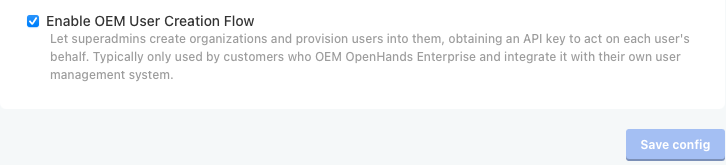
When it is disabled, `POST /api/organizations/provision-user` returns `404`. Org creation and superadmin management are always available.
## Troubleshooting
You are calling the wrong endpoint. That error comes from the internal service-to-service routes under `/api/service/*`, such as `POST /api/service/users/{user_id}/orgs/{org_id}/api-keys`. They authenticate with the `X-Service-API-Key` header, checked against the operator-provisioned `AUTOMATIONS_SERVICE_KEY` shared secret. That key is meant for the internal automations service, not for admins.
User provisioning is a different flow. Call `POST /api/organizations/provision-user` with an `Authorization: Bearer ` header and `X-Org-Id`. It never uses `X-Service-API-Key`. `X-Session-API-Key` (per-sandbox agent-server auth, used in other examples) is also distinct from the plain Bearer token this endpoint expects.
The feature is disabled. See [Enabling the Feature](#enabling-the-feature).
The caller lacks the `PROVISION_USER` permission (org `owner` or `admin`, or an instance super role), or you targeted a personal workspace. Provisioning into a personal workspace is rejected.
## Security
The provision-user response is a secret. The `password` is returned only there, because the endpoint bypasses the email-based set-password flow, and the `api_key` grants access as the new user. Do not log the response, hand the credential to the user out-of-band, and always use TLS. The script masks both values unless you pass `--show-secrets`.
* **Guard the superadmin token.** Anyone holding it can create orgs, mint users, and grant or revoke superadmin. Treat it like a root credential.
* A superadmin does **not** inherit org-scoped powers (secrets, billing, LLM settings, org deletion) in the orgs it creates.
## APIs Used
| Endpoint | Used for |
| - | - |
| `POST /api/organizations` | Create the org (superadmin only) |
| `POST /api/organizations/provision-user` | Create or re-provision a user and get an API key |
| `GET /api/organizations/{org_id}/me` | Verify the minted key and its role |
| `DELETE /api/organizations/{org_id}` | Demo cleanup: delete the org, as an org owner |
| `DELETE /api/admin/users/{user_id}` | Demo cleanup: delete a user, as the superadmin |
## Related
Act for many users from one account with per-conversation credentials
Inject secrets into a single conversation
The provisioning endpoint
Instance-level superadmin roles
reissue\_api\_key, action, and 200 vs 201
This documentation is built and hosted on [Mintlify](https://mintlify.com), a developer documentation platform.